DENTAFLOW Dental practice software · Algeria

Click a tooth.
You've just used DentaFlow.

This is not a picture: it's the software's odontogram, with the same anatomical outlines and the same FDI numbering.

Healthy Caries Filling Crown Missing Implant

Each click cycles through the states, exactly like in the software.

01 — WHAT YOU'RE GOING TO ASK

The six questions every dentist asks before buying.

What if the internet goes down?

Nothing happens. DentaFlow doesn't use it. Your data is on your PC, not on a foreign company's server.

How much per month?

Nothing. 12,000 DA once, three workstations included, for life. Updates are included. There is no other payment, ever.

What if my PC breaks down?

The software backs everything up on its own, every day. If the file is damaged, it restarts from the latest backup by itself and tells you how old it is.

I have three chairs.

Three workstations are included. A single code to enter on the main PC; the others find it on their own on the practice network. Additional workstation: 3,000 DA, for life.

Does it print the CNAS form?

Yes, with the registration number, procedures, fees and signature fields. Like quotes and prescriptions: A5 format, with your logo.

I'm not a computer person.

Installation takes two minutes and requires no administrator rights. You try it for three days on demo data, without entering a single patient.

02 — AT THE FRONT DESK

The patient fills in their form. Not your assistant.

A QR code on the counter. The patient scans it and enters their name, number and reason for visit on their own phone. The request appears instantly in the software, ready to become an appointment.

  • No app for the patient to install
  • Works on the practice Wi-Fi, without internet
  • One click to create the patient and set the date
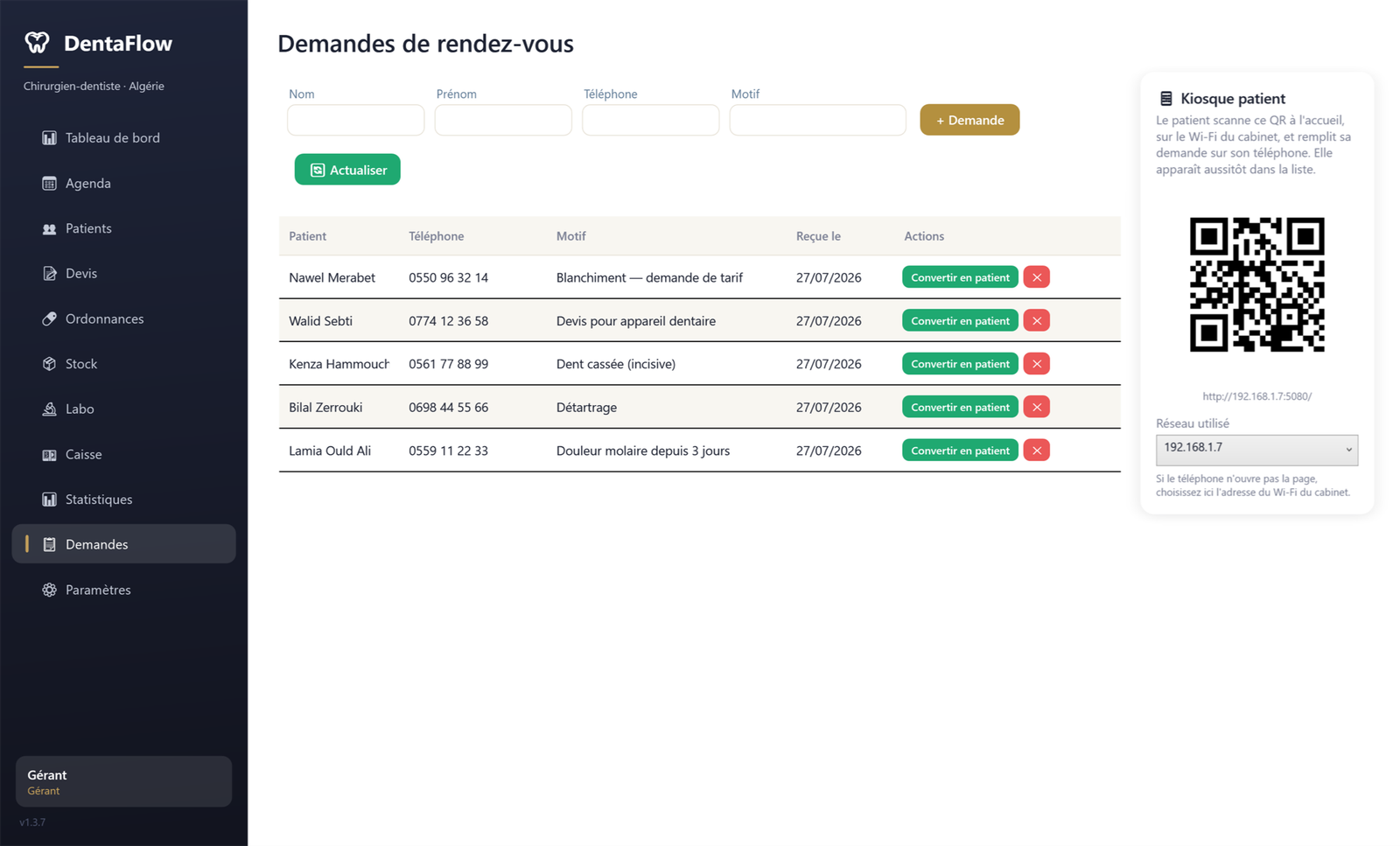
Appointment requests screen with the patient kiosk QR code
03 — THE PRACTICE WORKSTATIONS

One single code. The other workstations follow.

You don't buy three licences: you activate one, on the main PC. The other workstations find it on their own on the practice network.

WORKSTATION 1 — THE MAIN PC

Main PC

The front-desk PC or the lead practitioner's. It holds the licence and the data.

  • The activation code is entered here, once
  • It hosts the practice database
  • It publishes its licence on the local network
WORKSTATION 2

Assistant

Finds the main PC automatically and activates without a code. The manager assigns its role, username and PIN.

  • Appointments, patients, cash register
  • Purchase prices and margins hidden
WORKSTATION 3

Practitioner

Same principle: no code to enter. It sees the same database, updated live by every workstation.

  • Records, odontogram, treatments
  • Quotes and prescriptions
Practice local network — Wi-Fi or cable, no internet

If the main PC is switched off, the other workstations keep working for 72 hours. Beyond that, they wait for it to come back. A fourth workstation? 3,000 DA, for life.

04 — THE SOFTWARE

Eleven screens. Nothing superfluous.

The whole practice, from the morning appointment to the evening takings.

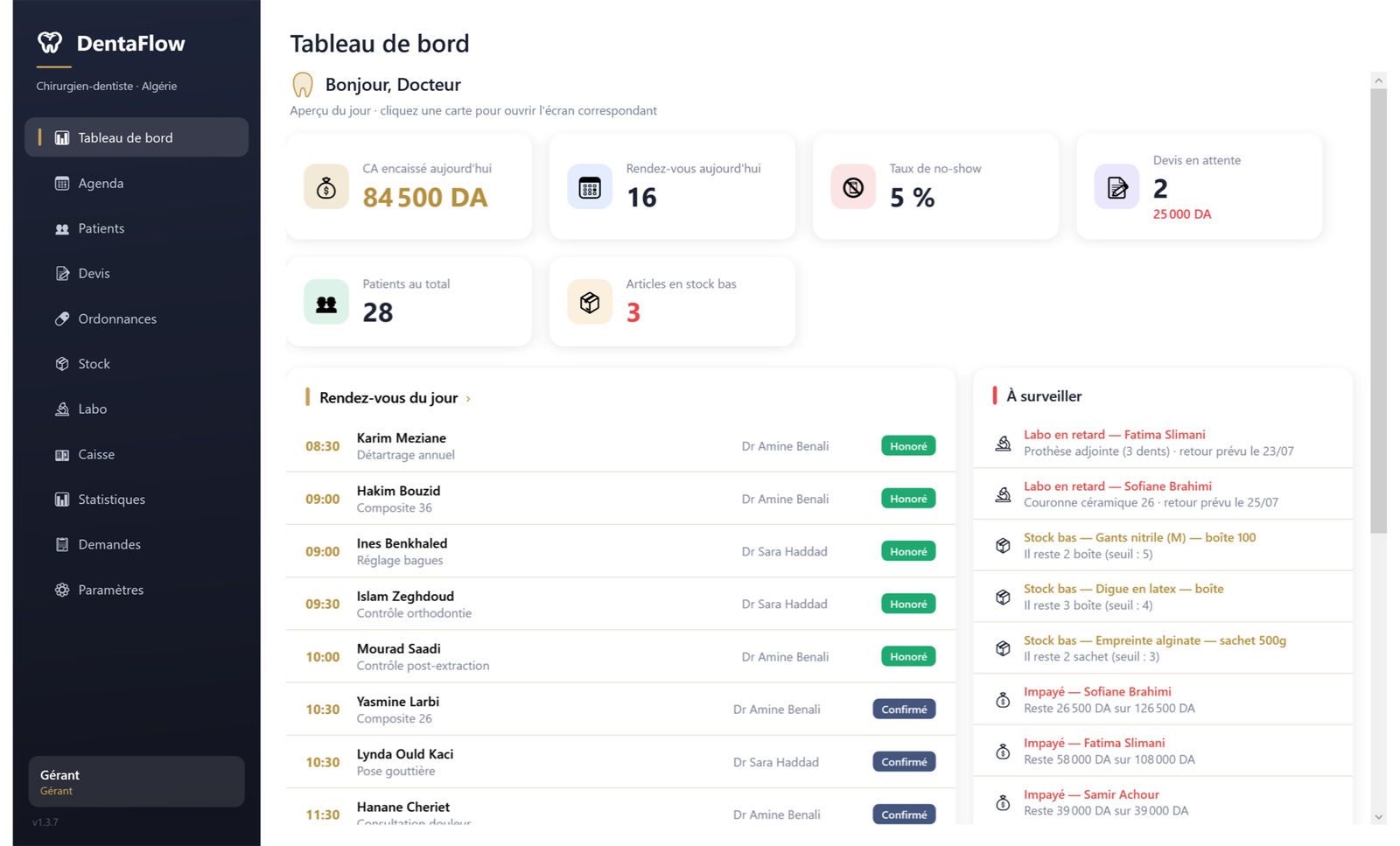
DentaFlow dashboard

Dashboard — the essentials of the day; each card opens with a click.

05 — COMPARISON

Compared with the two other ways of running a practice.

The notebook and spreadsheet on one side, subscription-based online software on the other. Here is what concretely changes.

Notebook or Excel Online software, by subscription DentaFlow
Works without internet Yes No, by nature Yes
What you pay Nothing Every month 12,000 DA, once
Where your data is At the practice On a remote server On your PC
Finding a patient record By hand Instant Instant
Today's takings, unpaid bills, no-shows To be recalculated Depends on the plan On the home screen
Odontogram Paper chart Depends on the plan Anatomical, front and top views
Unpaid bill reminders Manual Depends on the plan WhatsApp, in one click
If the storage is lost or damaged Everything is lost With the hosting provider Automatic backup, self-recovery
Practice workstations — Depends on the plan 3 included, +3,000 DA after that

Comparison with the two most common ways of working in Algerian practices. Online software varies a lot from one plan to another: the points marked “depends on the plan” should be checked with the vendor concerned.

06 — THE PRICE
12 000 DA
once, for life
3 workstationsincluded in the licence
+3,000 DAper additional workstation
3 daysof trial, all features

No subscription. No paid options. Updates are included.

07 — INCLUDED AT NO EXTRA COST

Everything is in the licence. No paid options.

Appointments by practitioner

Unlimited patient records

Odontogram, front and top views

Periodontics, 6 sites per tooth

Quotes and payment tracking

Unpaid bills and WhatsApp reminders

Template prescriptions as PDF

Certificates and sick notes

CNAS / CASNOS treatment form

Lab: sent, received, fitted

Stock, alert thresholds, kits per procedure

Cash book, Excel export

Statistics and activity per practitioner

Patient kiosk via QR code

Roles, permissions and PIN

Exportable activity log

Automatic daily backup

Automatic recovery if the file is damaged

You clicked on a tooth. The rest of the software is just as simple.

Two minutes to install, no administrator rights, demo data to try everything before entering your first patient.